Skip to content

BOIII

103 Topics 215 Posts

Black Ops 3

  • BO3 Guide

    Pinned Locked
    1
    1
    2 Votes
    1 Posts
    198k Views
    No one has replied
  • BO3 - How To Use And Download BOIIIWD

    Pinned until 26/11/2053, 21:16
    1
    19
    2 Votes
    1 Posts
    5k Views
    No one has replied
  • BO3-Enhanced Guide

    Pinned Locked bo3enhanced bo3 bo3-client
    1
    6
    0 Votes
    1 Posts
    50k Views
    No one has replied
  • BO3 DLCs

    Pinned Locked
    1
    1
    1 Votes
    1 Posts
    41k Views
    No one has replied
  • BO3 Languages

    Pinned Locked boiii languages boiii-languages
    1
    1
    2 Votes
    1 Posts
    17k Views
    No one has replied
  • Boiii Workshop downloader

    Pinned Locked boiii workshop github
    4
    2 Votes
    4 Posts
    9k Views
    ConkleyC
    very epic tool
  • BO3 Error - Active connection

    Pinned Locked active connection error
    1
    2
    7 Votes
    1 Posts
    28k Views
    No one has replied
  • Boiii error server

    1
    0 Votes
    1 Posts
    15 Views
    No one has replied
  • 0 Votes
    1 Posts
    3 Views
    No one has replied
  • Reshade in bo3 boii ?

    3
    0 Votes
    3 Posts
    716 Views
    B
    Hello I noticed that you didn't get a proper answer to this and I being the chud I am just figured it out(not really brave browsers ai helped me) make sure you don't have reshade installed into the games folder. 1.make a shortcut for the boiii.exe and right click the .exe go into properties(if you're on windows 11 show more options and then properties) and in the "target" section under the target location where you can actually type leave everything as is but add a space to the end of the text and add -launch this will skip loading the client and load straight into the game(I don't think you actually have to do this part but it saves a lot of time and effort by not having to click play) 2.run the reshade.exe and click "browse" and go into the black ops 3 folder and select the base games "black ops 3.exe" and install it normally 3.Run the boiii.exe and proceed as normal Might I suggest downloading these files from the MRTLEXIFY video I will link below as these actually make the game look amazing but do keep in mind if you plan on using these you must set your Anti-Aliasing to SMAA T2x in advanced settings or you will just have a black screen when loading into zombies and the background of the main menu will be black also. https://youtu.be/uIFoaUE3uvY(sorry if you don't want me posting links to stuff that link to things like github I tried this myself and it's actually really good) Have fun KING!!!!!!!!!
  • BlackOps3.exe Versions

    1
    1 Votes
    1 Posts
    516 Views
    No one has replied
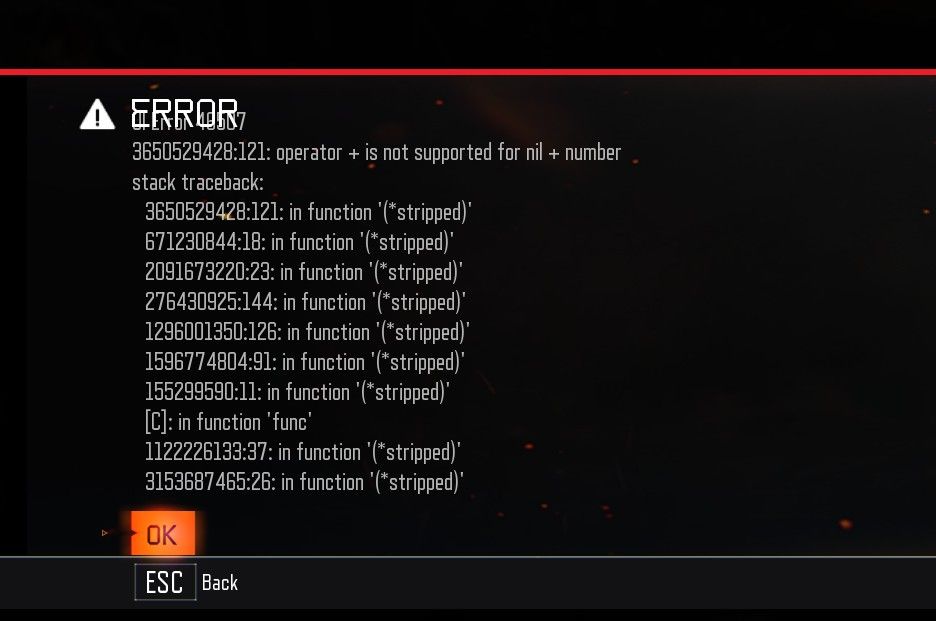
  • UI ERROR, 46507 or 48507

    2
    1
    0 Votes
    2 Posts
    105 Views
    SkwllS
    We'll release a new update soon (1-2 days) that will fix this and other issues. Just make sure you always use the latest version
  • More than 4 players in zombies guide

    1
    1
    1 Votes
    1 Posts
    219 Views
    No one has replied
  • How to Play BOIII with Friends via PLAYIT.GG (NEW METHOD)

    3
    1
    1 Votes
    3 Posts
    1k Views
    SabinoS
    Its easy tho, doesnt require a advanced knowledge to do it :v
  • Any way to put GIFs as profile pics in the game?

    2
    0 Votes
    2 Posts
    83 Views
    SabinoS
    Nope, there no way to put a pfp on BO3
  • Zetsobou No Shima Wonder Weapon Parts Issue on Custom Server

    2
    0 Votes
    2 Posts
    63 Views
    SkwllS
    Yeah don't worry we know about this bug since a while. It will be fixed in the next few updates :)
  • This topic is deleted!

    2
    0 Votes
    2 Posts
    159 Views
  • My game is glitched

    1
    3
    0 Votes
    1 Posts
    376 Views
    No one has replied
  • It Doesn’t boot.

    2
    1
    0 Votes
    2 Posts
    677 Views
    XxSolarXxX
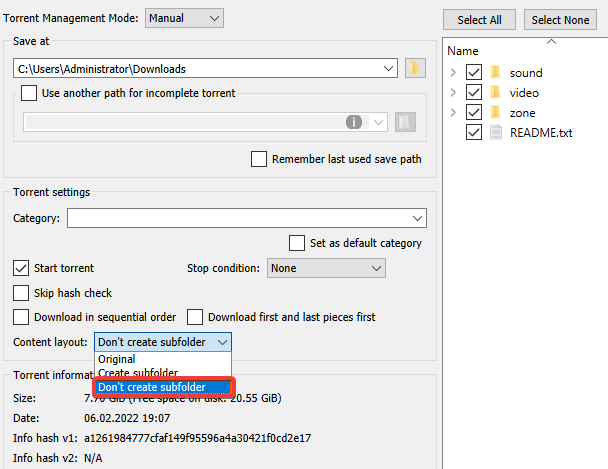
    @Killseeker Download completely t7_full_game.torrent and once it is completely downloaded, we will double click on it Locate the "Save At" section and click on the blue folder icon, there you need to locate the folder where you have Black Ops 3 installed or for simpler, locate where BlackOps3.exe is. Example: C:\Games\t7_full_game Locate the "Content Layout:" section and you will see that on the left side there will be something called "Original" well click on that and put "Do Not Create Subfolder" option and then click on "Ok" Now in the "Status" section it will show a message saying "Verifying or Checking" this is a sign that the files are being verified and if it finds a corrupt one, it will download it again and replace it with a new one. That should be all and you should have your cracked Black Ops 3 repaired (Note: this will completely replace the language to English, so keep this in mind if you have another language installed in your game that will be replaced by the English language).
  • Boiii's "active internet connection" issue

    5
    0 Votes
    5 Posts
    14k Views
    M
    a mi no se me ha arreglado, he hecho todos los pasos y no funciona