
How to Play BOIII with Friends via PLAYIT.GG (NEW METHOD)
-
NOTE: THIS IS A SIMPLE AND DIFFERENT METHOD FOR PLAYERS WHO COULDN'T GET WORK RADMIN/HAMACHI METHOD FROM FROZEDY GUIDE TO PLAY WITH FRIENDS
🛠️ STEP 1: Set Up PlayIt.GG
We will go to this page here and download the SET UP:
Once downloaded, we will open the .exe and install it on our PC (Totally safe)
We are going to open "Playit.gg.exe" in our Desktop, this will open a CMD with a message on it
"Visit link to setup (https,blah,blah,blah)" what are you gonna do is to copy only the link and put it in your search box in your navigator web💻 STEP 2: Account on Playit.gg
Once you put the link that the CMD provide you, it will appear that you need to create a account, click on it and you will use a Guest Account or you can create a normal account, both can work aswell
A message will pop up indicating that the program would like to create a new agent on your account, you will press on "Continue" orange bottom, another message will pop up, you will press "Continue" again
Now on the "Step 4" from the Setup Guide in PlayIT.gg site, you will press "Create Tunnel", once you go into it, it will appear up 3 option
"Use Shared IP" "Use Dedicated IP" "Use Dedicated Port", in our case will we you a Shared IP, on "Region" we will leave "Global Anycast" cause its the only one free and that one we need and "Tunnel Type" we will select "TCP+UDP (protocol)", once you done with it, you will make sure that "Enable Tunnel" is checked and you done, click on "Add Tunnel"Now you will see a "Update Local Address" section, below we will see two box "Local Address" and "Local Port", on Local Address we will leave it empty but in Local Port we will put 27017, once you put it, click on Update.
🕹️ Step 3: Hosting a Match:
Open BOIII and boot the game and select any mode (Zombies or Multiplayer)
Create a Private Match on any map, open the console (~) and type this command lobby_min_players 2 and start the match.
NOTE 2: The Match it will not start until the second player joins, and I will tell you how
🚀 Step 4: Connect to your friend match
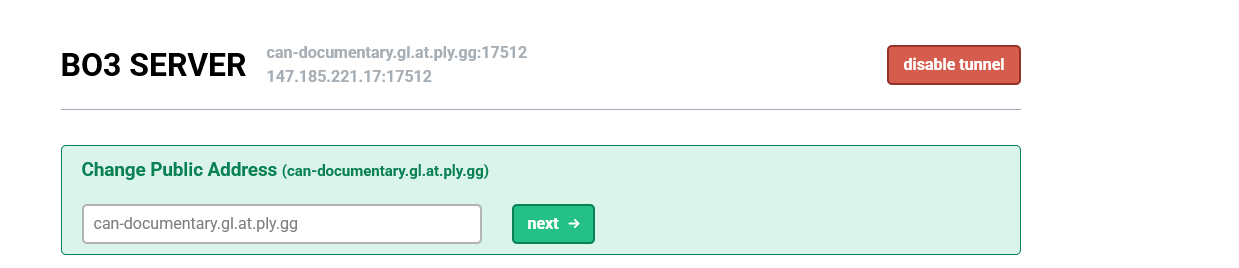
Get back to "PlayIT.gg" web site and in your "Tunnel" section, beside of your Tunnel name, it will be two IP (The Domain IP and the Public IP) both can work, now copy any of the two IP and send it to your friend
Once your friend has the IP, he will type in his console connect (IP) and pum, he will join into your match.
NOTE 3: The CMD has to be always open and running in the background for it to work, otherwise it won't work. You'll do this every time you want to play with your friends.
This methods works thank to: @Krynnx (All credits goes for him)


Hello! It looks like you're interested in this conversation, but you don't have an account yet.
Getting fed up of having to scroll through the same posts each visit? When you register for an account, you'll always come back to exactly where you were before, and choose to be notified of new replies (either via email, or push notification). You'll also be able to save bookmarks and upvote posts to show your appreciation to other community members.
With your input, this post could be even better 💗
Register Login